
Android2D ShapeDrawable 形を描く
Android2D では, ShapeDrawableというのがあります。
Developers
によると, Dynamicに図形を描画するためのオブジェクトということですが, オブジェクトを作ってプロパティを入れて, それをCanvasに貼付けるという
使い方のようです。
ShapeDrawable というクラスがBaseになっていて, その拡張クラスのオブジェクトを作成して, ShapeDrawableをつくりそれにプロパティを入れて,
Canvasに描画するという流れです。
ShapeDrawableで使えるのは,
| Object | Constructor | Description |
|---|---|---|
| RectShape | RectShape() | 四角です |
| RoundRectShape | oundRectShape(float[] outerRadii, RectF inset, float[] innerRadii) | 四角に丸角などがつけられます |
| PathShape | PathShape(Path path, float stdWidth, float stdHeight) | パスを描きます |
| ArcShape | ArcShape(float startAngle, float sweepAngle) | 弧です |
| OvalShape | OvalShape() | 楕円形です |
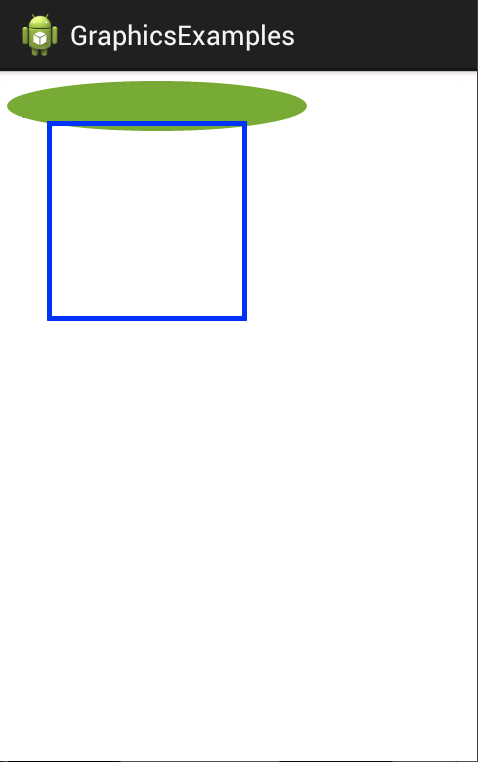
Google のサンプルをちょっと改造して作ってみました。
public class DrawableTestView extends View
{
	private ShapeDrawable drawshape;

	private ShapeDrawable roundRect;

	public DrawableTestView ( Context context )
	{
		super(context);

		drawshape = new ShapeDrawable(new OvalShape());
		drawshape.getPaint().setColor(0xff74AC23);
		drawshape.setBounds(10, 10, 310, 60);

		float[] outerR = new float[] { 1, 1, 1, 1, 1, 1, 1, 1 };
		RectF inset = new RectF(5, 5, 5, 5);
		float[] innerR = new float[] { 1, 1, 0, 0, 1, 1, 0, 0 };
		roundRect = new ShapeDrawable(new RoundRectShape(outerR, inset, innerR));
		roundRect.getPaint().setColor(Color.BLUE);
		roundRect.setBounds(50, 50, 250, 250);
	}

	@Override
	protected void onDraw ( Canvas canvas )
	{
		drawshape.draw(canvas);
		roundRect.draw(canvas);
	}
}
コンストラクタでShapeDrawableを作成して, onDrawで描くという形です。
参考
愚鈍なプログラマーの独り言 こちらのブログでは丁寧に使い方などの解説をしていらっしゃいます。すばらしい。