
Bootstrap3 UI parts
UI parts list
Text
text-left, text-center, text-right
<div class="text-right"><a href="#">Right</a></div>
Button
Add btn class in your input, or button tag.
<input type="submit" value="OK" class="btn">
<input type="reset" value="Reset" class="btn">
<button class="btn">Delete</button>
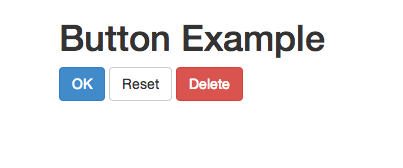
Other button classes
- btn-default
- btn-primary
- btn-success
- btn-info
- btn-warning
- btn-danger
Size
- btn-xs
- btn-sm
- btn-lg
- btn-block
Page Header
Add page-header class in an element.
<h1 class="page-header">Title</h1>
Under line is added under an element.
Panel
<div class="container">
	<div class="panel panel-info">
	   <div class="panel-heading">
		<h1 class="panel-title">Title</h1>
	   </div>
	   <div class="panel-body">
		Body
	   </div>
	   <div class="panel-footer">
		Footer
	   </div>
        </div>
</div>
Sign-in like with panel
<div class="panel panel-primary">
   <div class="panel-heading">
      <h1 class="panel-title">Signin</h1>
   </div>
   <div class="panel-body">
      <form>
         <div class-"form-group">
            <label for="username">Name</label>
            <input type="text" class="form-control" id="username">
         </div>
         <div class-"form-group">
            <label for="password">Password</label>
            <input type="password" class="form-control" id="password">
         </div>
         <br>
         <button type="submit" class="btn btn-default">Sign in</button
      </form>
   </div>
</div>

Well
Well is rect round sheet with color.
Use well class in div.
<div class="container">
	<div class="well">Well</div>
	<div class="well well-lg">Large</div>
	<div class="well well-sm">Small</div>
</div>
Badge
Add badge class to span
<li class="list-group-item"><span class="badge">10</span>A</li>
Progressbar
<div class="progress">
   <div class="progress-bar"
        role="progressbar"
        aria-voluenow="70"
        aria-voluemin="0"
        aria-voluemax="100"
   style="width:70%">
Label
   </div>
</div>
Color
- progress-bar-success
- progress-bar-info
- progress-bar-warning
- progress-bar-danger
stripe
progress-striped
animation
Add progress-striped and active