
Android Unity Plugin
Unity Support Android
Android SDK
Android SDK is jar or aar.
Unity can use both styles. Unity calls Java Code from C# or UnityScript.
This library is to show Toast in Android.
public class ShowUtils {
    public static void showMessage(Context context, String message) {
        Toast.makeText(context, message, Toast.LENGTH_SHORT).show();
    }
}
To build Android code as library, we need to change gradle
build.gradle
apply plugin: 'com.android.library'

android {
    compileSdkVersion 23
    buildToolsVersion "23.0.1"

    defaultConfig {
        minSdkVersion 15
        targetSdkVersion 23
        versionCode 1
        versionName "1.0"

        testInstrumentationRunner "android.support.test.runner.AndroidJUnitRunner"

    }
    buildTypes {
        release {
            minifyEnabled false
            proguardFiles getDefaultProguardFile('proguard-android.txt'), 'proguard-rules.pro'
        }
    }
}

sourceSets {
    main  {
        java {
            srcDir 'src/main/java'
        }
    }
}

task clearJar(type: Delete) {
    delete 'build/libs/' + "androidlib.jar"
}
task makeJar(type: Copy) {
    from('build/intermediates/bundles/release/')
    into('release/')
    include('classes.jar')
    rename('classes.jar', 'androidlib.jar')
}
makeJar.dependsOn(clearJar, build)

dependencies {
    compile fileTree(dir: 'libs', include: ['*.jar'])
    androidTestCompile('com.android.support.test.espresso:espresso-core:2.2.2', {
        exclude group: 'com.android.support', module: 'support-annotations'
    })
    compile 'com.android.support:appcompat-v7:23.2.1'
    testCompile 'junit:junit:4.12'
}
Run
gradle makeJar
We can get androidlib.jar
Integrate Android SDK
After building SDK, we need to import this into Unity Project.
Create space Plugins/Android under your project.
Copy jar file under this directory.
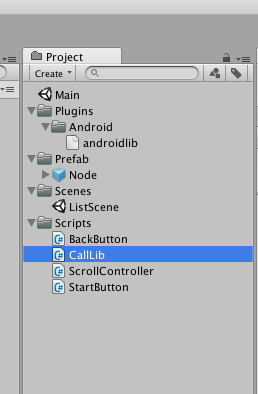
Write code(example)
public class CallLib : MonoBehaviour {

	public void OnClick() {
		// Call Lib
		if (Application.platform == RuntimePlatform.Android) {
			Debug.Log ("Android");

			using (AndroidJavaClass plugin = new AndroidJavaClass ("com.atmarkplant.androidlib.ShowUtils")) {
				AndroidJavaClass unity = new AndroidJavaClass("com.unity3d.player.UnityPlayer");
				AndroidJavaObject context = unity.GetStatic<AndroidJavaObject>("currentActivity").Call<AndroidJavaObject>("getApplicationContext");
				if (context != null) {
					plugin.CallStatic("showMessage", context, "Message");
				}
			}
		} else if (Application.platform == RuntimePlatform.IPhonePlayer) {
			Debug.Log ("iOS");
		} else {
			Debug.Log (Application.platform);
		}
	}
}
In this code, if the device is Android and, Unity can find Android class, Run Method named “getApplicationContext” and CallStatic method named shoeMessage